
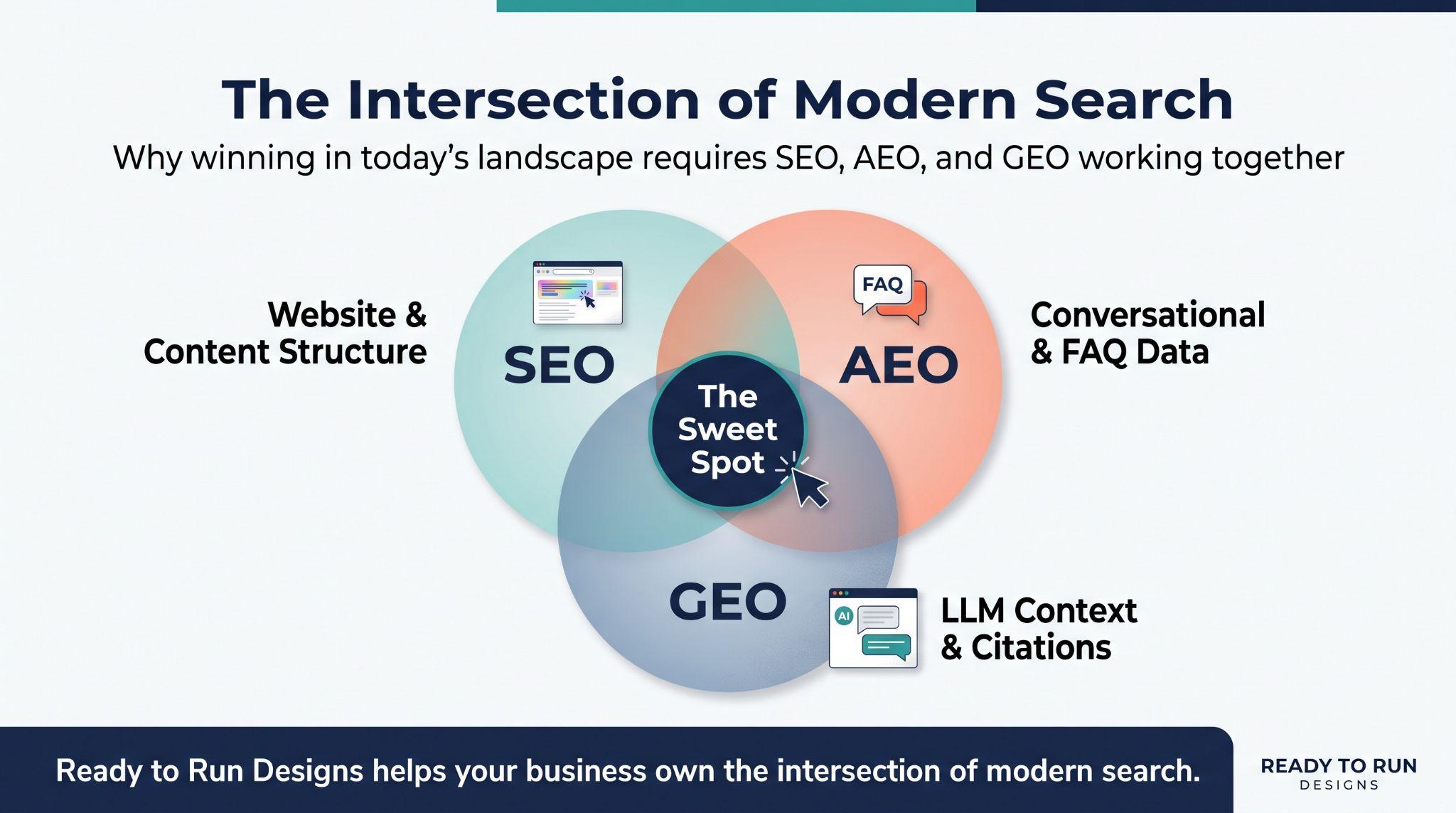
Your Customers Are Searching in New Ways
You would have to live under a rock to miss all the talk about artificial intelligence. And your website design is a huge part of that conversation. But when you run a business, you have more pressing things to do than keep up with each new search tool and trend.
To put it frankly: you need to know what to change, where to start, and whether the work will help bring in customers.
Someone looking for a political advisor or a specialized medical professional can now ask ChatGPT for nearby solutions. A couple planning a party can ask an AI tool to compare local venues. They can get answers before visiting your website.
Customers use those facts to decide whether to contact you. A venue page without a guest limit cannot answer a question about a 100-person event. That missing detail can keep the venue out of the customer’s shortlist.
This guide from Ready to Run Designs explains how AI is changing SEO and what to do about it. You will learn the terms, then work through changes to help people find your business and take the next step.
Does Your SEO Work Conflict With AI Search?
No. Keep the useful work you have already done. Google uses its Search index and ranking systems to support its AI search features. Its guidance for website owners says the same SEO basics still apply.
Your pages still need to be found and read. They also need to explain what you offer. AI has made those details more useful in answers that appear outside your site. Today, however, a search can end without a visit. That is called a zero-click search. A person might find your hours, read a summary, or start a new search.
Being Visible in Searches Doesn’t = Site Visits.
Share of Google search visits with a click on a traditional result
If you measure success by how many people visit your site, you may be measuring the wrong thing. This doesn’t mean site visit metrics are obsolete; it means they’re no longer a standalone bellwether. Why? Because today, your website and its content can appear in a Google search without anyone actually visiting it. An AI summary can answer a question directly on the results page, giving the person less reason to open a website.
In Pew Research Center’s study, a traditional result received a click in 8% of Google visits with an AI summary. Without a summary, the figure was 15%. These observations don’t establish cause and effect, but they give owners a reason to look beyond visibility when reviewing traffic.
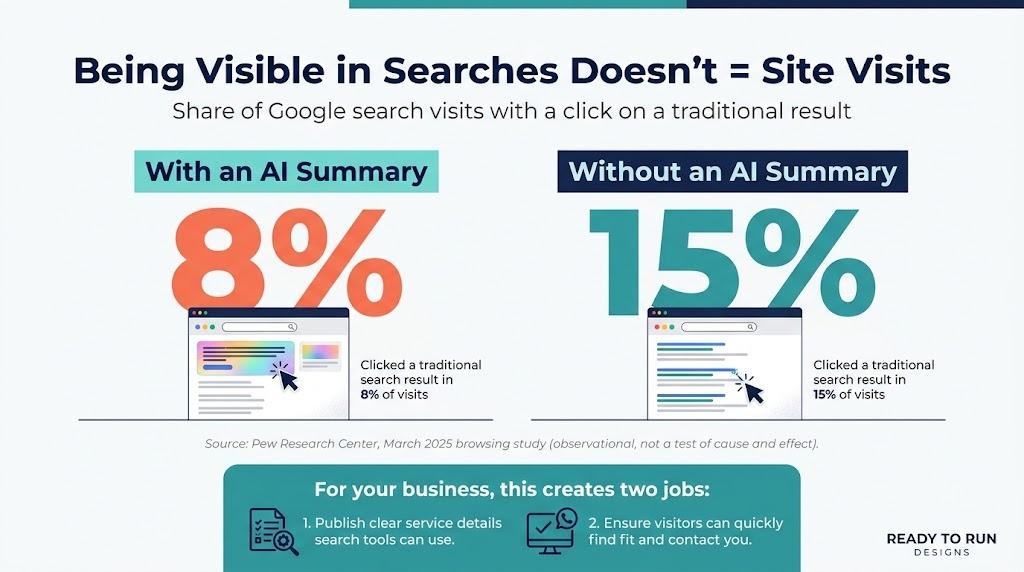
For your business, this creates two jobs.
- Publish clear service details that search tools can use when answering customer questions.
- Make sure anyone who reaches your site can quickly decide whether you fit their needs and contact you.
That is where AEO and GEO come into the picture.
What Is Search Engine Optimization (SEO), Answer Engine Optimization (AEO), and Generative Engine Optimization (GEO)?
Before we dive into what you can do, we need to lay the groundwork and discuss the difference between SEO, AEO, and GEO. While these are three different terms with different meanings, you fortunately don’t need separate assets to check the box for all three. These terms describe related ways to help people find and use your information.
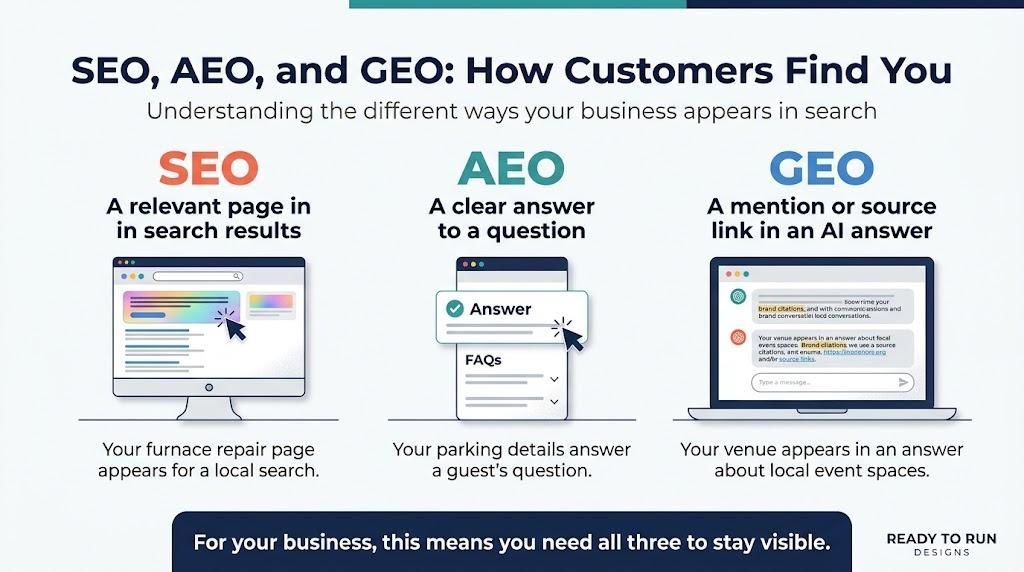
SEO Helps People Find Your Website
Search engine optimization helps your pages appear in search results. It includes the words on each page and the technical work that lets search engines access it. For example, a heating contractor needs a furnace repair page that names the area it serves. A general page called “Our Solutions” gives a customer less to work with.
AEO Helps Your Content Answer a Question
Answer engine optimization focuses on direct answers, such as a short search snippet or spoken response. For example, put “Do you offer on-site parking?” above the venue’s parking location and restrictions. A guest can use that answer without searching the rest of the page.
GEO Helps Your Business Appear in AI Answers
Generative engine optimization focuses on how your business and content appear in answers built from several sources. An AI tool comparing event venues needs facts such as capacity, location, and booking terms. Your page can supply those facts when they are public and easy to find.
SEO vs AEO vs GEO: A Simple Head-to-Head Analysis
How Do You Get Cited in ChatGPT, Perplexity, Claude, or Google AI Overviews?
A citation is a source link in an answer. It gives the reader a route to the page that supports a claim. A business mention can appear without that link.
ChatGPT Search and Perplexity can return answers with web sources. Claude can cite live web content when it searches. Google AI Overviews and AI Mode also show supporting links. They do not all pick the same sources.
No single submission gets your business into every AI answer. The work starts with the information on your site. Follow these steps to make it more useful.
1. Find the Questions People Ask Before They Contact You
Ask the person who answers your phone for the last ten questions they heard. Check quote requests and emails for others. These are better starting points than guessing what to write.
Sort them by the service or page they belong to. A repair question goes on the repair page. Put a venue’s food policy with its booking details.
| Service contractor | Which towns do you serve, and how do I request a quote? |
| Hotel or entertainment venue | How many guests fit, and what comes with the booking? |
| Medical practice | Do I need a referral, and how do I request a first visit? |
| Commercial real estate firm | What space is available, and who arranges a tour? |
| Political campaign | Which office and district is the candidate running for? |
Use the wording people use. “Do I need a referral?” is a clearer heading than “Patient Intake Requirements.”
2. Update the Pages That Bring in Business
Pick a service you want to grow and read the page that describes it. Look for missing details about the work, the area you serve, and how to get a price. A customer should find those answers on that page before they need to call. Here are a few tips for this segment.
Medical Practices: Explain the First Visit
Pull up a service page with your front-desk staff. Ask what a new patient would still need to call about. Referral requirements, the appointment process, and the correct office belong in the page text. Get insurance details from staff and have a qualified clinician check medical claims.
Service Contractors: Describe the Jobs You Handle
Read the page beside a recent quote request. Does the wording describe the same job? Include your service towns and explain what you need to prepare a quote, such as photos or a property visit. Emergency work needs its hours and contact number spelled out.
Hotels and Event Venues: Publish the Booking Details
Check whether your booking page answers the questions in your last event inquiry. For example, listing the guest limit without a comprehensive room layout leaves out a critical part of the answer. Include details like layouts, parking, and other items. Then include a link to ask about pricing or dates.
Commercial Real Estate: Amplify Pre-Tour Usefulness
Make finding information about a listing as easy as possible. Active listings should show availability status, square footage, and permitted event types. To keep information as up to date as possible, decide who will update the page when the space is leased or sold.
Political Campaigns: Make Official Information Easy to Find
Check the home page without scrolling: is the office and district clear beside the candidate’s name? Make issue positions, events, and the volunteer form accessible from the navigation. Remove expired events, and send visitors to official election sources for voting instructions.
Create a page for each distinct service that needs a full explanation. Avoid making a separate page for every slight change in a search phrase.
3. Put the Answer First and Add Proof
Put each answer under a clear heading. On a venue page, “Guest Capacity” should lead straight to the number of people each room layout can hold. The reader should not have to work through the venue history to find it.
Ask a crew member to describe a completed repair, then use their checked account alongside photos on the project page. Get the customer’s permission before sharing the job.
You already have material for this in job notes, plans, and staff knowledge. Ask the team which details customers tend to misunderstand. Those details often make a more useful page than another broad industry overview.
The GEO study tested ways to improve a source’s visibility in generated answers. Some changes improved visibility by up to 40% in those tests. These included adding source citations and statistics. For a business owner, the useful lesson is to publish facts you can substantiate. Bookings require separate measurement.
4. Make Local Business Details Match
No one likes conflicting information, especially from AI chatbots. To avoid this, here are a few steps you can take:
- Assign one staff member to check your Google Business Profile after contact details change. Compare it with the website and the directories people use to find you.
- Fix old addresses wherever you control the entry. Ask publishers to correct other listings.
For a hotel, check the booking link. For a medical office, check the right location and appointment number. For a campaign, state the office and district clearly on the official site and profiles. Include a current contact.
Ask actual customers for honest reviews. Do not buy reviews or invent an experience. A short account of a real job gives future customers useful context.
5. Give Your Web Team a Short Technical Checklist
You do not need to learn code to request these checks. Send your web team the URLs of your most important pages.
| Can Google index the page? | An accidental restriction can keep it out of search. |
| Can the intended search crawlers access it? | Security settings can block access to public content. |
| Are key details readable text? | A menu, flyer, or brochure image can leave facts hard to use. |
| Do useful pages link to it? | Visitors and search systems need a route to the page. |
| Does it work on a phone? | A slow page or broken form can cost you the inquiry. |
Also ask about structured data, often called Schema markup. These labels describe facts such as your business name, location, or an event date.
Your web team should choose labels that fit the page and match what visitors can read. Google requires no special Schema markup for its AI features. Adding more labels does not guarantee a citation.
6. Build Useful References Beyond Your Website
Find the places where customers check your business. For a contractor, check the trade association listing. A venue could appear on a local tourism site. A property firm should review its commercial real estate listings.
Search your business name and open the listings on the first page of results. You may find an old directory entry you forgot about. Claim or correct it through the publisher’s process, especially if it lists a previous address or phone number.
A venue owner could also publish a walkthrough on YouTube and embed it on the venue page. Label it with the venue name and location. Describe the room and access details in text, using the same facts as the booking page.
Reddit: Build Trust Before Promoting Your Business
Reddit can be a powerful ally in your AEO and GEO strategy because LLMs and AI engines rely heavily on candid, human-to-human discussions on this platform. Seems easy enough, right? However, if you attempt to promote your business on Reddit, you will quickly discover how protective the moderators and members are of the platform. It’s best to set aside regular time for someone who knows how to participate and navigate Reddit’s rules and community guidelines.
7. Make the Next Step Obvious
Take the contact process all the way through on a phone. After submitting the form, check with staff that it arrived and that they can reply using the details collected. The confirmation should tell the customer what happens next.
The wording on a contact button matters when someone is still deciding whether to act. “Schedule a Property Tour” sets an expectation that a generic “Submit” button cannot.
For the form itself, have the person who answers inquiries mark the fields needed for a first reply. Review the remaining required fields together. Is a full catering plan really necessary to ask about an available date?
How Should a Small Business Start With AI SEO?
Start with one service page and work through the steps below over the next month. Choose a service your team has room to take on. If furnace repairs are the priority, focus there before spreading your budget across the whole site.
- Gather the questions customers ask. Ask the person who handles inquiries to pull recurring questions from recent calls or emails. Use those questions to review the service page.
- Record your starting point. Save the current traffic and inquiry figures, then date the update and describe it in a change log. An entry such as “added service towns” is enough to identify the work later.
- Fill in the missing answers. Work through the customer questions the page does not yet answer. Get the details from someone who provides the service, then ask them to check the revision. A project photo can support the explanation when it shows something useful.
- Use AI to help review the draft. Paste the page and your customer questions into the tool, using only information you are allowed to share. Ask it to identify unanswered questions without supplying business facts of its own. Your staff should decide which suggestions belong in the draft.
- Test the page and contact process. Have your web team report back on the checklist, including whether form submissions appear in analytics. Make a test call through the page’s phone link.
- Review results and choose the next page. Review the page’s clicks in Google Search Console beside calls and form inquiries for the same dates. Keep that report running as you begin work on the next page.
Ready to Run Designs can turn that review into page updates, content, and technical fixes. If the work keeps getting pushed aside, bring us the page and the problem you want it to solve.
What Mistakes Should Small Businesses Avoid With AI SEO?
When optimizing your site for AEO or GEO, it’s easy to think “more content is better.” In the age of AI, it’s easy to think you can plug in a query and pump out content en masse. But to optimize for AEO and GEO, you need a more strategic approach. Before you approve a content proposal, check for these problems:
- Ordering more blogs while service pages remain incomplete. Read the service page first. Does it explain the job, service area, and inquiry process? Budget time to fill those gaps.
- Publishing business details nobody confirmed. Have the person responsible for the service approve the draft. Check availability, pricing, and limits before publishing.
- Reporting only AI mentions. Include AI mentions in the report alongside calls and bookings for the same period. Ask how many inquiries became customers.
- Paying for guaranteed chatbot placement. Before paying, get the proposed work and reporting in writing. Ask how you can verify the promised placement, since the vendor does not select sources for the chatbot.
- Creating several pages that answer the same question. Ask what purpose each page serves. Combine overlapping drafts when one complete page would help the customer more.
- Publishing advice without showing your experience. Give the writer access to staff knowledge, project details, or original photos. A page should explain something your business knows firsthand.
- Leaving outdated content untouched. Have staff flag pages with old contact details or services you no longer offer. Budget time for those corrections alongside new work.
- Sending visitors to a broken contact process. A form that sends requests to an unchecked inbox wastes the visit. Have a staff member verify delivery before the page goes live.
For every proposed page, ask the writer: “What customer question will this answer, and what will the reader be able to do next?
Google’s AI content guidance allows useful AI-assisted work, but warns against producing pages at scale without added value. Ask the writer what customer question each page will answer.
Get a Practical Search Plan From Ready to Run Designs
You do not have to sort out every AI tool before improving your website.
Ready to Run Designs offers website design, content, and search services. We can help you work out which pages need attention and make it easier for visitors to contact you.
Call (877) 269-8644 or complete our contact form to request a free consultation. Share your website, the service you want to grow, and what is not working. That gives us a clear place to start.
Small Business Frequently Asked Questions About AI Search
Can a Small Business Compete With a Bigger Brand?
Yes. Start with the services and local questions your team knows well. Clear details about a real job, location, or booking process give customers information they can use. You do not need to cover every topic in your industry.
Will AI-Written Content Hurt My Rankings?
AI help alone does not cause a penalty. Check the facts and add your own knowledge before publishing. The problem is content that adds little value or exists mainly to manipulate search results.
Do I Need to Rebuild My Website?
Have your site reviewed before committing to a rebuild. A working site with thin service pages needs a different plan from one with a broken mobile layout or an editor your staff cannot use. R2R can discuss the problems and scope the work around them.
How Can I Tell Whether AI Search Is Helping?
Test a small set of customer questions across search tools and save the answers. Note any mention or link to your business. Ask new customers how they found you, then follow those inquiries through to bookings or sales.
Can Ready to Run Designs Handle the Work for Me?
Yes. Tell Ready to Run Designs what you want your website to do. We can discuss the content, design, and search work needed to support that goal.